CommBox offers a structured buy back program that gives schools a responsible, streamlined way to return old screens when upgrading to new CommBox equipment.
Program open to Education partners only.
How The Process Works
Your Commitment
The audit is your commitment to the process and allows CommBox to assess your existing screens and determine the next steps.
Conduct an Audit
To get started, either your IT manager or your reseller completes an audit of your existing screens.
Information We Need
For CommBox screens, we require the serial number, model and size. For competitor screens, we require the date of purchase, model and size.
CommBox Reviews
Once the audit is complete, CommBox reviews the details and confirms the buy back value and next steps.
What Screens We Accept
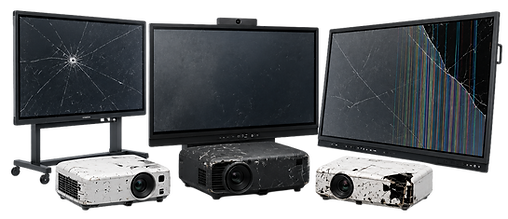
We accept any screen regardless of brand or working condition. This includes CommBox screens of any age, competitor interactive displays and projectors. Screens do not need to be in working condition.

How Credit Works
We accept any screen regardless of brand or working condition. This includes CommBox screens of any age, competitor interactive displays and projectors. Screens do not need to be in working condition.
What Happens To Your Screens
What happens to your screens depends on a number of factors including age, condition and warranty status. Suitable screens may be refurbished and redeployed through Kirra Services, while screens that cannot be refurbished are recycled responsibly through approved recycling pathways.
Getting Started
Speak to your CommBox reseller or our CommBox team directly.
